











Die DMX4ALL GmbH ist ein Ingenieurbüro mit dem Produktschwerpunkt der Licht- und Steuerungs- technik basierend auf dem ARTNET,DMX512 und RDM Protokoll.
DMX-Servo-Control 2


€50.77*
151 available


Delivery time: on stock (1 day)
- Direct from the manufacturer
- dispatch within 24 hours on weekdays
-
 Made in Germany
 -
 Made in Europe
 - technical support
 PayPal
  Pay Later
  SEPA direct debit
  Pay upon invoice
  Google Pay
  Apple Pay
  Credit or debit card
  Bancontact
  eps
eps  iDEAL
iDEAL  OXXO supported by Paypal
  Przelewy24
  BLIK
BLIK  Multibanco
  MyBank
  Paid in advance
  Cash on delivery
  Bar
Bar  Invoice plus payment extension fee
  EC Kartenzahlung Zahlung bei Abholung Kredit- oder Debitkarte bei Abholung
 Product information "DMX-Servo-Control 2"
 DMX-Servo-Control 2 DMX-Servo-Control 2 |
The DMX-Servo-Control 2 is designed for controlling of two servos via DMX.
Two Servos
The DMX Servo Control 2 has two servo ports. Each can be controlled via one DMX channel.
Servos with 5V up to 12V DC can be used
The supply voltage of the DMX-Servo-Control 2 is between 5V and 12V.
Servos with a supply voltage within this range can be connected directly.
Adjustable Servo control signal
The controlling occurs via an adjustable pulse width.
Compact Design
The design and the compact construction allows an installation of this small assembly in areas that do not offer much space.
LED-Display
The integrated LED is a multifunctional display for showing the current device status.
DMX Addressing
The DMX addressing is settable via a 10-position DIP switch.
RDM Support
The DMX Servo Control 2 allows configuration via RDM over DMX.
| Specifications |
| Power supply: | 5-12V DC / 50mA without connected servo |
| Protocol: | DMX512 |
| RDM | |
| Servo voltage: | 5-12V DC (corresponds to the supply voltage) |
| Servo-Power: | max. 3A in sum for both servos |
| DMX-Channels: | 2 Channels |
| Connection: | Screw terminals/pin header |
| Dimensions: | 30mm x 67 mm |
| Product Downloads |
| Application Notes |
DMX4ALL GmbH
Reiterweg 2A
Germany
WEEE DE37841650
+49 2327 2204600
kontakt@dmx4all.de
 Warning
Please note that all installation, service and maintenance work may only be carried out by qualified specialists.
Attention, the appliance is not a toy and must not be allowed to fall into the hands of children.
Waste disposalElectrical and electronic products must not be disposed of with household waste. At the end of its service life, the product must be disposed of in accordance with the applicable legal regulations and local conditions.
You might also be interested in:

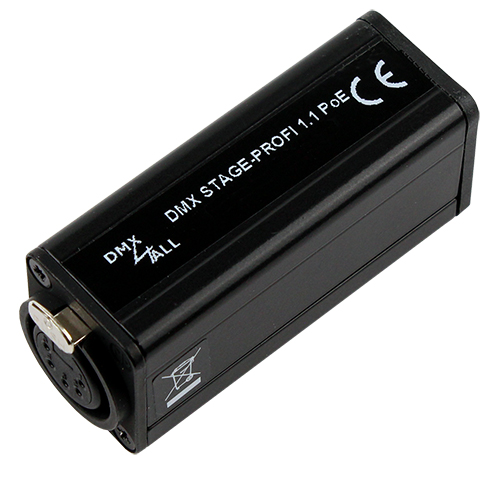
DMX STAGE-PROFI 1.1 PoE (XLR3)The DMX STAGE-PROFI 1.1 PoE is a compact bidirectional Ethernet Gateway (DMX via Ethernet), whichcan be used for Art-Net™ / TPM2 / USB to DMX / sACN to DMX / RDM or DMX to Art-Net™.Via a standard RJ45 net work connection the connection to ethernet net work occurs.Switchable DMX directionThe DMX direction can be switched according to usage.Settable DMX frame rateIn the DMX-OUTPUT mode the DMX frame rate is adjustable, so this interface is compatible to "slow" DMX devices.RDM via Art-Net™Supports RDM via Art-Net™ and thus enables connected PoE devices to be configured via Art-Net™ using corresponding software.Muteable LED DisplayThe LED-Display at the DMX STAGE-PROFI 1.1 PoE is disengageable via Art-Net™-Command (AcLedMute)or time controlled. This is very helpful to avoid disturbing “light points” on stage.Easy Webbrowser-ConfigurationA user-friendly configuration via a web browser allows a fast and uncomplicated setting of all parameters.No special software is required, a normal web browser is sufficient. Thus, the configuration at any timefrom your PC, smartphone or tablet device.DMX-Monitor The DMX monitor is available via the web interface. This means that the current DMX valuescan be displayed and checked simultaneously without any additional software.DMX-Fader The DMX fader is available via the web interface. This allows the DMX values to be output to be set without additional software.Easy Network ConfigurationFor easy setting of the IP-address, we provide the IP Configurator as a PC tool or Android app available for free.This allows you to leave the network settings unchanged and can easily configure the IP.High quality and Compact DesignThe DMX STAGE-PROFI 1.1 PoE is designed with a 3-pin Neutrik-XLR-Connection metal design and cased in an aluminium housing.Art-Net™ Merge-FunctionTwo Art-Net™ sources are output by LTP (Latest) or HTP (Highest) combined to the DMX output.Combinable with WiFi componentsIn combination with a WLAN bridge the DMX STAGE-PROFI 1.1 PoE can also be integrated into WLAN net works.Firmware update functionTo use future functions the DMX STAGE-PROFI 1.1 PoE offers a Firmware-Update-Function.This can be started with any web browser, so no direct access to the device is necessary!DMX4ALL Communication-InterfaceThe DMX STAGE-PROFI 1.1 PoE has an additional communication interface using the DMX4ALL-Commands via TCP or UDP packages. Art-Net ™ Designed by and Copyright Artistic Licence Holdings Ltd. Specifications Power supply:PoE according to IEEE 802.af or 5V DC via attached external power supplyConnection:RJ45 Ethernet USB Mini-B Neutrik® XLR3 Ethernet:10 Mbit/s | 100 Mbit/s DHCP PoE DMX:Selectable: - 512 channels OUT - 512 channels IN DMX-Framerate:Adjustable (5 - 44 fps) RDM:RDM via Art-Net™ (switchable on/off) ArtDmx Fail:HOLD last data(DMX-OUT)CLEAR all to 0% SET all to 100% NO OUTPUT DEFAULT VALUES INTERNAL PROGRAM DMX Fail:HOLD last data(DMX-IN)CLEAR all to 0% SET all to 100% NO OUTPUT DEFAULT VALUES Protocol:Art-Net™ (downwards compatiblel) Ethernet-VCP (Virtual COM Port) USB-VCP (Virtual COM Port) TPM2 sACN (Unicast) DMX4ALL-Commands via TCP, UDP, VCP Internal programs:User-configurable stand-alone programs Status LED:Green: Ethernet Connection Yellow: Datatransfer Dimensions:75mm x 26mm x 35 mm Produkt DownloadsDMX STAGE-PROFI 1.1 PoEBedienungsanleitung DMX STAGE-PROFI 1.1 PoEUser Manual DMX STAGE-PROFI 1.1 PoEEthernet VCP Driver 32 & 64bit - Version 1.10 DMX STAGE-PROFI 1.1 PoEUSB VCP Driver 32 & 64bit - Version 42.0.1.0 DMX STAGE-PROFI 1.1 PoEFirmware Software & ToolsDMX-Configurator V2Windows 32 & 64bit DMX-Configurator V2Bedienungsanleitung DMX-Configurator V2User Manual IP Configurator (ArtNet Produkte)Windows 32 & 64bit IP ConfiguratorAnwendungshinweis IP ConfiguratorApplication Note DMX4ALL CommandsDMX4ALL Commands for Third-Party Developers RDM Configurator (ArtNet Produkte)Windows 32 & 64bit RDM ConfiguratorBedienungsanleitung RDM ConfiguratorUser Manual
Delivery time: on stock (1 day)
DMX STAGE-PROFI 1.1 PoE (XLR5)The DMX STAGE-PROFI 1.1 PoE is a compact bidirectional Ethernet Gateway (DMX via Ethernet), whichcan be used for Art-Net™ / TPM2 / USB to DMX / sACN to DMX / RDM or DMX to Art-Net™.Via a standard RJ45 net work connection the connection to ethernet net work occurs.Switchable DMX directionThe DMX direction can be switched according to usage.Settable DMX frame rateIn the DMX-OUTPUT mode the DMX frame rate is adjustable, so this interface is compatible to "slow" DMX devices.RDM via Art-Net™Supports RDM via Art-Net™ and thus enables connected PoE devices to be configured via Art-Net™ using corresponding software.Disengageable LED displayThe LED-Display at the DMX STAGE-PROFI 1.1 PoE is disengageable via Art-Net™-Command (AcLedMute)or time controlled. This is very helpful to avoid disturbing “light points” on stage.Easy Webbrowser-ConfigurationA user-friendly configuration via a web browser allows a fast and uncomplicated setting of all parameters.No special software is required, a normal web browser is sufficient. Thus, the configuration at any timefrom your PC, smartphone or tablet device.DMX-Monitor The DMX monitor is available via the web interface. This means that the current DMX valuescan be displayed and checked simultaneously without any additional software.DMX-Fader The DMX fader is available via the web interface. This allows the DMX values to be output to be set without additional software.Easy Network ConfigurationFor easy setting of the IP-address, we provide the IP Configurator as a PC tool or Android app available for free.This allows you to leave the network settings unchanged and can easily configure the IP.High quality and Compact DesignThe DMX STAGE-PROFI 1.1 PoE is designed with a 3-pin Neutrik-XLR-Connection metal design and cased in an aluminium housing.Art-Net™ Merge-FunctionTwo Art-Net™ sources are output by LTP (Latest) or HTP (Highest) combined to the DMX output.Combinable with WiFi componentsIn combination with a WLAN bridge the DMX STAGE-PROFI 1.1 PoE can also be integrated into WLAN net works.Firmware update functionTo use future functions the DMX STAGE-PROFI 1.1 PoE offers a Firmware-Update-Function.This can be started with any web browser, so no direct access to the device is necessary!DMX4ALL Communication-InterfaceThe DMX STAGE-PROFI 1.1 PoE has an additional communication interface using the DMX4ALL-Commands via TCP or UDP packages. Art-Net ™ Designed by and Copyright Artistic Licence Holdings Ltd. Specifications Power supply:PoE according to IEEE 802.af or 5V DC via attached external power supplyConnection:RJ45 Ethernet USB Mini-B Neutrik® XLR3 Ethernet:10 Mbit/s | 100 Mbit/s DHCP PoE DMX:Selectable: - 512 channels OUT - 512 channels IN DMX-Framerate:Adjustable (5 - 44 fps) RDM:RDM via Art-Net™ (switchable on/off) ArtDmx Fail:HOLD last data(DMX-OUT)CLEAR all to 0% SET all to 100% NO OUTPUT DEFAULT VALUES INTERNAL PROGRAM DMX Fail:HOLD last data(DMX-IN)CLEAR all to 0% SET all to 100% NO OUTPUT DEFAULT VALUES Protocol:Art-Net™ (downwards compatiblel) Ethernet-VCP (Virtual COM Port) USB-VCP (Virtual COM Port) TPM2 sACN (Unicast) DMX4ALL-Commands via TCP, UDP, VCP Internal programs:User-configurable stand-alone programs Status LED:Green: Ethernet Connection Yellow: Datatransfer Dimensions:75mm x 26mm x 35 mm Produkt DownloadsDMX STAGE-PROFI 1.1 PoEBedienungsanleitung DMX STAGE-PROFI 1.1 PoEUser Manual DMX STAGE-PROFI 1.1 PoEEthernet VCP Driver 32 & 64bit - Version 1.10 DMX STAGE-PROFI 1.1 PoEUSB VCP Driver 32 & 64bit - Version 42.0.1.0 DMX STAGE-PROFI 1.1 PoEFirmware Software & ToolsDMX-Configurator V2Windows 32 & 64bit DMX-Configurator V2Bedienungsanleitung DMX-Configurator V2User Manual IP Configurator (ArtNet Produkte)Windows 32 & 64bit IP ConfiguratorAnwendungshinweis IP ConfiguratorApplication Note DMX4ALL CommandsDMX4ALL Commands for Third-Party Developers RDM Configurator (ArtNet Produkte)Windows 32 & 64bit RDM ConfiguratorBedienungsanleitung RDM ConfiguratorUser Manual
Delivery time: on stock (1 day)
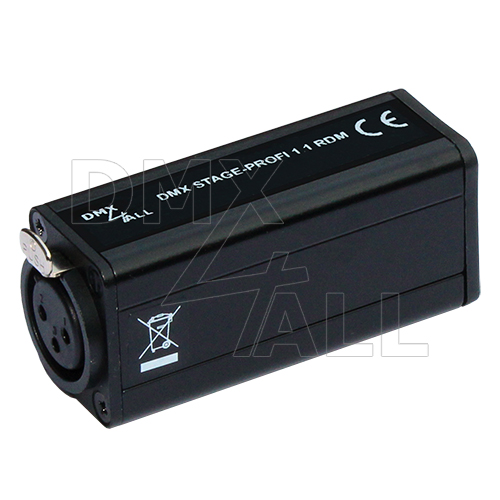
DMX STAGE-PROFI 1.1 RDM (XLR3)The DMX STAGE-PROFI 1.1 RDM is a compact bidirectional Ethernet Gateway (DMX via Ethernet), whichcan be used for Art-Net™ / TPM2 / USB to DMX / sACN to DMX / RDM or DMX to Art-Net™.Via a standard RJ45 net work connection the connection to ethernet net work occurs.Switchable DMX directionThe DMX direction can be switched according to usage.Settable DMX frame rateIn the DMX-OUTPUT mode the DMX frame rate is adjustable, so this interface is compatible to "slow" DMX devices.RDM via Art-Net™Supports RDM via Art-Net™ and thus enables connected RDM devices to be configured via Art-Net™ using corresponding software.Muteable LED displayThe LED-Display at the DMX STAGE-PROFI 1.1 RDM is disengageable via Art-Net™-Command (AcLedMute)or time controlled. This is very helpful to avoid disturbing “light points” on stage.DHCPThe DMX STAGE-PROFI 1.1 RDM has a DHCP function for automatic addressing in the network.Internal stand-alone programs The internal programs make the DMX STAGE-PROFI 1.1 RDM a stand-alone device. The programs can be calledup via the web interface, when the device is switched on, or when Art-Net™ data is missing.Easy ConfigurationA user-friendly configuration via a web browser allows a fast and uncomplicated setting of all parameters.No special software is required, a normal web browser is sufficient. Thus, the configuration at any timefrom your PC, smartphone or tablet device.DMX-Monitor The DMX monitor is available via the web interface. This means that the current DMX valuescan be displayed and checked simultaneously without any additional software.DMX-Fader The DMX fader is available via the web interface. This allows the DMX values to be output to be set without additional software.Easy Network ConfigurationFor easy setting of the IP-address, we provide the IP Configurator as a PC tool or Android app available for free.This allows you to leave the network settings unchanged and can easily configure the IP.High quality and Compact DesignThe DMX STAGE-PROFI 1.1 RDM is designed with a 3-pin Neutrik-XLR-Connection metal design and cased in an aluminium housing.Art-Net™ Merge-FunctionTwo Art-Net™ sources are output by LTP (Latest) or HTP (Highest) combined to the DMX output.Combinable with WiFi componentsIn combination with a WLAN bridge the DMX STAGE-PROFI 1.1 RDM can also be integrated into WLAN net works.Firmware update functionTo use future functions the DMX STAGE-PROFI 1.1 RDM offers a Firmware-Update-Function.This can be started with any web browser, so no direct access to the device is necessary!DMX4ALL Communication-InterfaceThe DMX STAGE-PROFI 1.1 RDM has an additional communication interface using the DMX4ALL-Commands via TCP or UDP packages. Art-Net ™ Designed by and Copyright Artistic Licence Holdings Ltd. Specifications Power supply:5V DC via attached external power supply Connection:RJ45 Ethernet USB Mini-B Neutrik® XLR3 Ethernet:10 Mbit/s | 100 Mbit/s DMX:Selectable: - 512 channels OUT - 512 channels IN DMX-Framerate:Adjustable (5 - 44 fps) RDM:RDM via Art-Net™ (switchable on/off) ArtDmx Fail:HOLD last data(DMX-OUT)CLEAR all to 0% SET all to 100% NO OUTPUT DEFAULT VALUES SET all to 100% NO OUTPUT DEFAULT VALUES INTERNAL PROGRAMDMX Fail:HOLD last data(DMX-IN)CLEAR all to 0% SET all to 100% NO OUTPUT DEFAULT VALUES Protocol:Art-Net™ (downwards compatiblel) Ethernet-VCP (Virtual COM Port) USB-VCP (Virtual COM Port) TPM2 sACN (Unicast) DMX4ALL-Commands via TCP, UDP, VCP Internal program:User-configurable stand-alone program Status LED:Green: Ethernet Connection Yellow: Datatransfer Dimensions:75mm x 26mm x 35 mm Produkt DownloadsDMX STAGE-PROFI 1.1 RDM (XLR3)Bedienungsanleitung DMX STAGE-PROFI 1.1 RDM (XLR3)User Manual DMX STAGE-PROFI 1.1 RDM (XLR3)Ethernet VCP Driver 32 & 64bit - Version 1.10 DMX STAGE-PROFI 1.1 RDM (XLR3)USB VCP Driver 32 & 64bit - Version 42.0.1.0 DMX STAGE-PROFI 1.1 RDM (XLR3)Firmware Software & ToolsDMX-Configurator V2Windows 32 & 64bit DMX-Configurator V2Bedienungsanleitung DMX-Configurator V2User Manual IP Configurator (ArtNet Produkte)Windows 32 & 64bit IP ConfiguratorAnwendungshinweis IP ConfiguratorApplication Note DMX4ALL CommandsDMX4ALL Commands for Third-Party Developers RDM Configurator (ArtNet Produkte)Windows 32 & 64bit RDM ConfiguratorBedienungsanleitung RDM ConfiguratorUser Manual
Delivery time: on stock (1 day)

DMX STAGE-PROFI 1.1 RDM (XLR5)The DMX STAGE-PROFI 1.1 RDM is a compact bidirectional Ethernet Gateway (DMX via Ethernet), whichcan be used for Art-Net™ / TPM2 / USB to DMX / sACN to DMX / RDM or DMX to Art-Net™.Via a standard RJ45 net work connection the connection to ethernet net work occurs.Switchable DMX directionThe DMX direction can be switched according to usage.Settable DMX frame rateIn the DMX-OUTPUT mode the DMX frame rate is adjustable, so this interface is compatible to "slow" DMX devices.RDM via Art-Net™Supports RDM via Art-Net™ and thus enables connected RDM devices to be configured via Art-Net™ using corresponding software.Muteable LED displayThe LED-Display at the DMX STAGE-PROFI 1.1 RDM is disengageable via Art-Net™-Command (AcLedMute)or time controlled. This is very helpful to avoid disturbing “light points” on stage.DHCPThe DMX STAGE-PROFI 1.1 RDM has a DHCP function for automatic addressing in the network.Internal stand-alone programs The internal programs make the DMX STAGE-PROFI 1.1 RDM a stand-alone device. The programs can be calledup via the web interface, when the device is switched on, or when Art-Net™ data is missing.Easy ConfigurationA user-friendly configuration via a web browser allows a fast and uncomplicated setting of all parameters.No special software is required, a normal web browser is sufficient. Thus, the configuration at any timefrom your PC, smartphone or tablet device.DMX-Monitor The DMX monitor is available via the web interface. This means that the current DMX valuescan be displayed and checked simultaneously without any additional software.DMX-Fader The DMX fader is available via the web interface. This allows the DMX values to be output to be set without additional software.Easy Network ConfigurationFor easy setting of the IP-address, we provide the IP Configurator as a PC tool or Android app available for free.This allows you to leave the network settings unchanged and can easily configure the IP.High quality and Compact DesignThe DMX STAGE-PROFI 1.1 RDM is designed with a 3-pin Neutrik-XLR-Connection metal design and cased in an aluminium housing.Art-Net™ Merge-FunctionTwo Art-Net™ sources are output by LTP (Latest) or HTP (Highest) combined to the DMX output.Combinable with WiFi componentsIn combination with a WLAN bridge the DMX STAGE-PROFI 1.1 RDM can also be integrated into WLAN net works.Firmware update functionTo use future functions the DMX STAGE-PROFI 1.1 RDM offers a Firmware-Update-Function.This can be started with any web browser, so no direct access to the device is necessary!DMX4ALL Communication-InterfaceThe DMX STAGE-PROFI 1.1 RDM has an additional communication interface using the DMX4ALL-Commands via TCP or UDP packages. Art-Net ™ Designed by and Copyright Artistic Licence Holdings Ltd. Specifications Power supply:5V DC via attached external power supply Connection:RJ45 Ethernet USB Mini-B Neutrik® XLR5 Ethernet:10 Mbit/s | 100 Mbit/s DMX:Selectable: - 512 channels OUT - 512 channels IN DMX-Framerate:Adjustable (5 - 44 fps) RDM:RDM via Art-Net™ (switchable on/off) ArtDmx Fail:HOLD last data(DMX-OUT)CLEAR all to 0% SET all to 100% NO OUTPUT DEFAULT VALUES INTERNAL PROGRAM DMX Fail:HOLD last data(DMX-IN)CLEAR all to 0% SET all to 100% NO OUTPUT DEFAULT VALUES Protocol:Art-Net™ (downwards compatiblel) Ethernet-VCP (Virtual COM Port) USB-VCP (Virtual COM Port) TPM2 sACN (Unicast) DMX4ALL-Commands via TCP, UDP, VCP Internal program:User-configurable stand-alone program Status LED:Green: Ethernet Connection Yellow: Datatransfer Dimensions:75mm x 26mm x 35 mm Produkt DownloadsDMX STAGE-PROFI 1.1 RDM (XLR5)Bedienungsanleitung DMX STAGE-PROFI 1.1 RDM (XLR5)User Manual DMX STAGE-PROFI 1.1 RDM (XLR5)Ethernet VCP Driver 32 & 64bit - Version 1.10 DMX STAGE-PROFI 1.1 RDM (XLR5)USB VCP Driver 32 & 64bit - Version 42.0.1.0 DMX STAGE-PROFI 1.1 RDM (XLR5)Firmware Software & ToolsDMX-Configurator V2Windows 32 & 64bit DMX-Configurator V2Bedienungsanleitung DMX-Configurator V2User Manual IP Configurator (ArtNet Produkte)Windows 32 & 64bit IP ConfiguratorAnwendungshinweis IP ConfiguratorApplication Note DMX4ALL CommandsDMX4ALL Commands for Third-Party Developers RDM Configurator (ArtNet Produkte)Windows 32 & 64bit RDM ConfiguratorBedienungsanleitung RDM ConfiguratorUser Manual
Delivery time: on stock (1 day)

DMX UNIVERSE DR1.1 RDMThe DMX UNIVERSE DR1.1 RDM is a compact bidirectional Ethernet Gateway whichcan be used for Art-Net™/TPM2/sACN to DMX/RDM or DMX to Art-Net™.With a standard RJ45 network connector the connection to the ArtNet is made.DMX direction selectableThe DMX direction can be switched depending on use.Adjustable DMX-FramerateIn DMX OUTPUT mode, the DMX framerate is adjustable so that this interface is compatible with "slow" DMX devices.RDM via Art-Net™Supports RDM via Art-Net™, which enables connected RDM devices to be configured via Art-Net™ with the appropriate software.Free RDM-SoftwareTo set parameters via RDM our free software RDM-Configurator is available as download on our website www.dmx4all.de .Muteable LED indicatorThe LED indicators on the DMX UNIVERSE DR1.1 RDM are muteable by Art-Net™ command (AcLedMute) or time-controlled.This is helpful to disturbing "points of light" especially on stages.DHCPThe DMX UNIVERSE DR1.1 RDM has a DHCP function for automatic addressing in the network.Internal stand-alone programs The internal programs make the DMX UNIVERSE DR1.1 RDM a stand-alone device. The programs can be calledup via the web interface, when the device is switched on, or when Art-Net™ data is missing.Easy Webbrowser-ConfigurationA user-friendly configuration via a web browser allows a fast and uncomplicated setting of all parameters.No special software is required, a normal web browser is sufficient. Thus, the configuration at any timefrom your PC, smartphone or tablet device.DMX-Monitor The DMX monitor is available via the web interface. This means that the current DMX valuescan be displayed and checked simultaneously without any additional software.DMX-Fader The DMX fader is available via the web interface. This allows the DMX values to be output to be set without additional software.Easy Network ConfigurationFor easy setting of the IP-address, we provide the IP Configurator as a PC tool or Android app available for free.This allows you to leave the network settings unchanged and can easily configure the IP.Compact designThe DMX UNIVERSE DR1.1 RDM is designed for mounting in a 350mm DIN rail housing.Use together with WiFi componentsIn conjunction with a WiFi-bridge the DMX UNIVERSE DR1.1 RDM can be integrated into standard WiFi networks.Firmware-Update-FunctionIn order to take advantage of future features, the DMX UNIVERSE DR1.1 RDM has a firmware update function.This can be launched from the browser so that no access to the device is necessary!DMX4ALL-Command interfaceThe DMX UNIVERSE DR1.1 RDM has another communication interface that is compatible withthe LAN-DMX STAGE-PROFI. This interface uses the DMX4ALL commands via TCP or UDP packets. Art-Net ™ Designed by and Copyright Artistic Licence Holdings Ltd. Specifications Power supply:8-24V DC (150mA@12V; 100mA@24V) Connection:Ethernet: RJ45 Power/DMX: Screw terminal DMX:Selectable: - 512 channels OUT - 512 channels IN DMX-Framerate:Adjustable (5 - 44 fps) RDM:RDM via Art-Net™ Data Fail:HOLD last data(DMX-OUT)CLEAR all to 0% SET all to 100% NO OUTPUT DEFAULT VALUES INTERNAL PROGRAM DMX-IN Fail:HOLD last data(DMX-IN)CLEAR all to 0% SET all to 100% NO OUTPUT DEFAULT VALUES Protocol:Art-Net™ TPM2 sACN (Unicast) DMX4ALL commands (as well as the LAN-DMX STAGE-PROFI) Internal program:User-configurable stand-alone program Status LED:Green: Ethernet Connection Yellow: Datatransfer Dimensions:29,2mm x 82mm Product DownloadsDMX UNIVERSE DR1.1 RDMBedienungsanleitung DMX UNIVERSE DR1.1 RDMUser Manual DMX UNIVERSE DR1.1 RDMEthernet VCP Driver 32 & 64bit - Version 1.10 DMX UNIVERSE DR1.1 RDMFirmware DMX4ALL CommandsDMX4ALL Commands for Third-Party Developers Software & ToolsDMX-Configurator V2Windows 32 & 64bit DMX-Configurator V2Bedienungsanleitung DMX-Configurator V2User Manual IP Configurator (ArtNet Produkte)Windows 32 & 64bit IP ConfiguratorAnwendungshinweis IP ConfiguratorApplication Note RDM Configurator (ArtNet Produkte)Windows 32 & 64bit RDM ConfiguratorBedienungsanleitung RDM ConfiguratorUser Manual
Delivery time: on stock (1 day)