





Die DMX4ALL GmbH ist ein Ingenieurbüro mit dem Produktschwerpunkt der Licht- und Steuerungs- technik basierend auf dem ARTNET,DMX512 und RDM Protokoll.
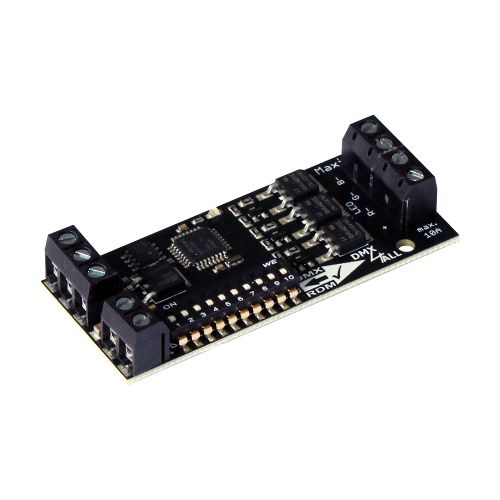
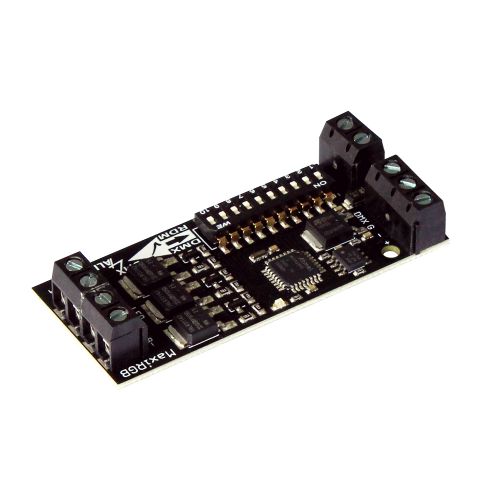
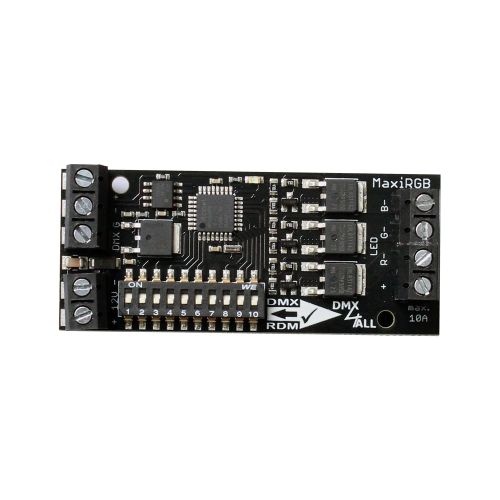
DMX-LED-Dimmer MaxiRGB RDM

€53.55

Delivery time: on stock (1 day)
99 available
- Direct from the manufacturer
- ships within 24 hours, Monday through Thursday
-
 Made in Germany
  Made in Europe
 - technical support

Product information "DMX-LED-Dimmer MaxiRGB RDM"
 DMX-LED-Dimmer MaxiRGB RDM DMX-LED-Dimmer MaxiRGB RDM |
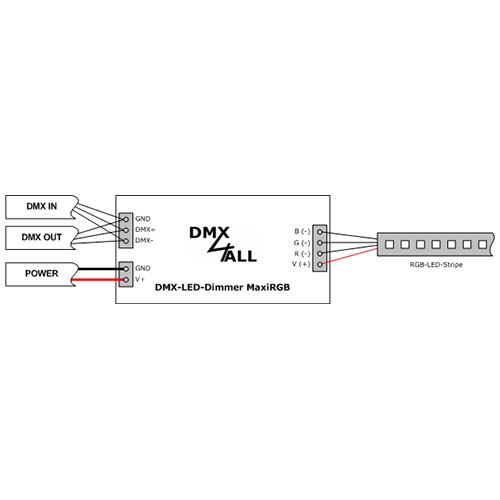
The DMX-LED-Dimmer MaxiRGB RDM is especially designed for controlling the RGB LED-Stripes with 12V or 24V.
3 LED Outputs
A total of 3 independent LED outputs are available.
RGB or single-color strips
The three separate LED outputs, which can be controlled independently via DMX, can be used for RGB or individual single-color LED strips.
0% – 100% dimmable
The outputs are dimmable from 0% to 100% via DMX with 8-bit resolution.
Compact design
The design and compact form factor allow this small assembly to be installed in areas with limited space.
Status LED
The integrated LED is a multifunction LED that displays the current device status.
DMX Addressing
DMX addressing is performed via RDM or, with priority, via a DIP switch.
DMX-FAIL Function
An adjustable DMX FAIL function offers the option to get in case of loss DMX signal the current state (HOLD)
or predefined a preset value.
DMX master dimmer
Optionally, an additional DMX channel can be activated as a master dimmer for all outputs.
Einstellbare Ausgangsfrequenz 
The output frequency at the LED outputs can be switched between 240 Hz and 980 Hz via RDM.
SubDevice-Mode
In SubDevice mode, each output is assigned its own DMX address and DMX FAIL behavior via RDM.
RDM Support
The DMX-LED-Dimmer MaxiRGB RDM allows configuration by RDM via DMX.
Lockable device settings
The RDM parameters Lock Pin and Lock State allow or prohibit the modification of stored RDM parameters
in order to prevent unauthorized changes.
Free RDM-Software
To set the parameters via RDM, our free RDM Configurator software is available to download from our website www.dmx4all.de.
| Specifications |
| Power supply: | 12-24 DC / 50mA (without connected load) |
| The supply voltage must correspond to the voltage for the LED stripe! | |
| LED voltage: | 12-24V DC (no AC voltage !) |
| DMX Input: | DMX512 |
| LED Output: | 3x (R/G/B) max. 10A each |
| together max. 10A with common anode (+) | |
| common power supply | |
| PWM resolution: | 256 steps (8-Bit), linear |
| PWM duty cycle: | 0-100% |
| PWM frequency: | 240 Hz / 980 Hz |
| Connectors: | 1x screw terminal / 2-pole |
| 1x screw terminal / 3-pole | |
| 1x screw terminal / 4-pole | |
| Dimensions: | 70mm x 30mm |
| Product Downloads |
DMX4ALL GmbH
Reiterweg 2A
Germany
WEEE DE37841650
+49 2327 2204600
kontakt@dmx4all.de
 Warning
Please note that all installation, service and maintenance work may only be carried out by qualified specialists.
Attention, the appliance is not a toy and must not be allowed to fall into the hands of children.
Waste disposalElectrical and electronic products must not be disposed of with household waste. At the end of its service life, the product must be disposed of in accordance with the applicable legal regulations and local conditions.
We recommend the following for this product:
 +221
+221 
DMX STAGE-PROFI 1.1 RDM (XLR3)The DMX STAGE-PROFI 1.1 RDM is a compact bidirectional Ethernet Gateway (DMX via Ethernet), whichcan be used for Art-Net™ / TPM2 / USB to DMX / sACN to DMX / RDM or DMX to Art-Net™.Via a standard RJ45 net work connection the connection to ethernet net work occurs.Switchable DMX directionThe DMX direction can be switched according to usage.Settable DMX frame rateIn the DMX-OUTPUT mode the DMX frame rate is adjustable, so this interface is compatible to "slow" DMX devices.RDM via Art-Net™Supports RDM via Art-Net™ and thus enables connected RDM devices to be configured via Art-Net™ using corresponding software.Muteable LED displayThe LED-Display at the DMX STAGE-PROFI 1.1 RDM is disengageable via Art-Net™-Command (AcLedMute)or time controlled. This is very helpful to avoid disturbing “light points” on stage.DHCPThe DMX STAGE-PROFI 1.1 RDM has a DHCP function for automatic addressing in the network.Internal stand-alone programsThe internal programs make the DMX STAGE-PROFI 1.1 RDM a stand-alone device. The programs can be calledup via the web interface, when the device is switched on, or when Art-Net™ data is missing.Easy ConfigurationA user-friendly configuration via a web browser allows a fast and uncomplicated setting of all parameters.No special software is required, a normal web browser is sufficient. Thus, the configuration at any timefrom your PC, smartphone or tablet device.DMX-Monitor The DMX monitor is available via the web interface. This means that the current DMX valuescan be displayed and checked simultaneously without any additional software.DMX-Fader The DMX fader is available via the web interface. This allows the DMX values to be output to be set without additional software.RDM-Editor The internal RDM editor in the web interface allows you to view the RDM devicesand edit the parameters Device Name, DMX Start Address and Personality.Easy Network ConfigurationFor easy setting of the IP-address, we provide the IP Configurator as a PC tool or Android app available for free.This allows you to leave the network settings unchanged and can easily configure the IP.High quality and Compact DesignThe DMX STAGE-PROFI 1.1 RDM is designed with a 3-pin Neutrik-XLR-Connection metal design and cased in an aluminium housing.Art-Net™ Merge-FunctionTwo Art-Net™ sources are output by LTP (Latest) or HTP (Highest) combined to the DMX output.Combinable with WiFi componentsIn combination with a WLAN bridge the DMX STAGE-PROFI 1.1 RDM can also be integrated into WLAN net works.Firmware update functionTo use future functions the DMX STAGE-PROFI 1.1 RDM offers a Firmware-Update-Function.This can be started with any web browser, so no direct access to the device is necessary!DMX4ALL Communication-InterfaceThe DMX STAGE-PROFI 1.1 RDM has an additional communication interface using the DMX4ALL-Commands via TCP or UDP packages. Art-Net ™ Designed by and Copyright Artistic Licence Holdings Ltd. Specifications Power supply:5V DC via attached external power supply Connection:RJ45 Ethernet USB Mini-B Neutrik® XLR3 Ethernet:10 Mbit/s | 100 Mbit/s DMX:Selectable: - 512 channels OUT - 512 channels IN DMX-Framerate:Adjustable (5 - 44 fps) RDM:RDM via Art-Net™ (switchable on/off) ArtDmx Fail:HOLD last data(DMX-OUT)CLEAR all to 0% SET all to 100% NO OUTPUT DEFAULT VALUES SET all to 100% NO OUTPUT DEFAULT VALUES INTERNAL PROGRAMDMX Fail:HOLD last data(DMX-IN)CLEAR all to 0% SET all to 100% NO OUTPUT DEFAULT VALUES Protocol:Art-Net™ (downwards compatiblel) Ethernet-VCP (Virtual COM Port) USB-VCP (Virtual COM Port) TPM2 sACN (Unicast) DMX4ALL-Commands via TCP, UDP, VCP Internal program:User-configurable stand-alone program Status LED:Green: Ethernet Connection Yellow: Datatransfer Dimensions:75mm x 26mm x 35 mm Produkt DownloadsDMX STAGE-PROFI 1.1 RDM (XLR3)Bedienungsanleitung DMX STAGE-PROFI 1.1 RDM (XLR3)User Manual DMX STAGE-PROFI 1.1 RDM (XLR3)Ethernet VCP Driver 32 & 64bit - Version 1.10 DMX STAGE-PROFI 1.1 RDM (XLR3)USB VCP Driver 32 & 64bit - Version 42.0.1.0 DMX STAGE-PROFI 1.1 RDM (XLR3)Firmware Software & ToolsDMX4ALL Software PackDMX / RDM / IP ConfiguratorWindows 32 & 64bit DMX4ALL CommandsDMX4ALL Commands for Third-Party Developers
Delivery time: on stock (1 day)
+182 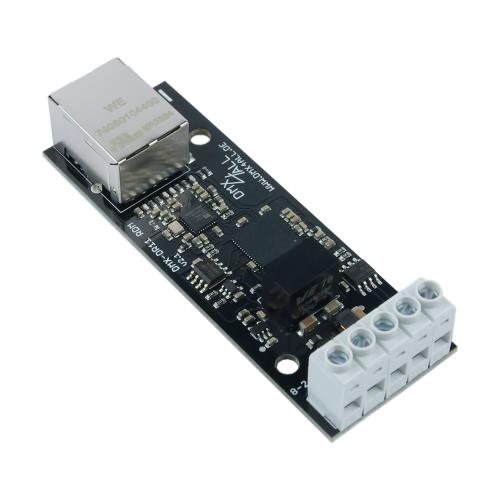
DMX UNIVERSE DR1.1 RDMThe DMX UNIVERSE DR1.1 RDM is a compact bidirectional Ethernet Gateway whichcan be used for Art-Net™/TPM2/sACN to DMX/RDM or DMX to Art-Net™.With a standard RJ45 network connector the connection to the ArtNet is made.DMX direction selectableThe DMX direction can be switched depending on use.Adjustable DMX-FramerateIn DMX OUTPUT mode, the DMX framerate is adjustable so that this interface is compatible with "slow" DMX devices.RDM via Art-Net™Supports RDM via Art-Net™, which enables connected RDM devices to be configured via Art-Net™ with the appropriate software.Free RDM-SoftwareTo set parameters via RDM our free software RDM-Configurator is available as download on our website www.dmx4all.de .Muteable LED indicatorThe LED indicators on the DMX UNIVERSE DR1.1 RDM are muteable by Art-Net™ command (AcLedMute) or time-controlled.This is helpful to disturbing "points of light" especially on stages.DHCPThe DMX UNIVERSE DR1.1 RDM has a DHCP function for automatic addressing in the network.Internal stand-alone programsThe internal programs make the DMX UNIVERSE DR1.1 RDM a stand-alone device. The programs can be calledup via the web interface, when the device is switched on, or when Art-Net™ data is missing.Easy Webbrowser-ConfigurationA user-friendly configuration via a web browser allows a fast and uncomplicated setting of all parameters.No special software is required, a normal web browser is sufficient. Thus, the configuration at any timefrom your PC, smartphone or tablet device.DMX-Monitor The DMX monitor is available via the web interface. This means that the current DMX valuescan be displayed and checked simultaneously without any additional software.DMX-Fader The DMX fader is available via the web interface. This allows the DMX values to be output to be set without additional software.RDM-Editor The internal RDM editor in the web interface allows you to view the RDM devicesand edit the parameters Device Name, DMX Start Address and Personality.Easy Network ConfigurationFor easy setting of the IP-address, we provide the IP Configurator as a PC tool or Android app available for free.This allows you to leave the network settings unchanged and can easily configure the IP.Compact designThe DMX UNIVERSE DR1.1 RDM is designed for mounting in a 350mm DIN rail housing.Use together with WiFi componentsIn conjunction with a WiFi-bridge the DMX UNIVERSE DR1.1 RDM can be integrated into standard WiFi networks.Firmware-Update-FunctionIn order to take advantage of future features, the DMX UNIVERSE DR1.1 RDM has a firmware update function.This can be launched from the browser so that no access to the device is necessary!DMX4ALL-Command interfaceThe DMX UNIVERSE DR1.1 RDM has another communication interface that is compatible withthe LAN-DMX STAGE-PROFI. This interface uses the DMX4ALL commands via TCP or UDP packets. Art-Net ™ Designed by and Copyright Artistic Licence Holdings Ltd. Specifications Power supply:8-24V DC (150mA@12V; 100mA@24V) Connection:Ethernet: RJ45 Power/DMX: Screw terminal DMX:Selectable: - 512 channels OUT - 512 channels IN DMX-Framerate:Adjustable (5 - 44 fps) RDM:RDM via Art-Net™ Data Fail:HOLD last data(DMX-OUT)CLEAR all to 0% SET all to 100% NO OUTPUT DEFAULT VALUES INTERNAL PROGRAM DMX-IN Fail:HOLD last data(DMX-IN)CLEAR all to 0% SET all to 100% NO OUTPUT DEFAULT VALUES Protocol:Art-Net™ TPM2 sACN (Unicast) DMX4ALL commands (as well as the LAN-DMX STAGE-PROFI) Internal program:User-configurable stand-alone program Status LED:Green: Ethernet Connection Yellow: Datatransfer Dimensions:29,2mm x 82mm Product DownloadsDMX UNIVERSE DR1.1 RDMBedienungsanleitung DMX UNIVERSE DR1.1 RDMUser Manual DMX UNIVERSE DR1.1 RDMEthernet VCP Driver 32 & 64bit - Version 1.10 DMX UNIVERSE DR1.1 RDMFirmware DMX4ALL CommandsDMX4ALL Commands for Third-Party Developers Software & ToolsDMX4ALL Software PackDMX / RDM / IP ConfiguratorWindows 32 & 64bit DMX4ALL CommandsDMX4ALL Commands for Third-Party Developers
Delivery time: on stock (1 day)
+89 
LED-Stripe RGB 12V 5m 60WSAn easy installation due to optimal flexibility and with a self-adhesive backside the stripes stick to almost each surface.Ideal for room and scenery lighting.Due to the low dimensions an application is possible where usual standard-illuminant can not be used. Colour: Red / Green / Blue - assembled with 300 RGB SMD-LEDs. Specifications Power supply:12V DC / Common Anode (+)Power consumption:max. 14,4 W/mLED Type:SMD5050 R:500-650MCD G:1200-1350MCD B:350-500MCDLED view angle:120°Design:self-adhesive backside 300x RGB LED (60LEDs/m) divisible each 3 LEDs / 5cm delivery on plastic reelLength:5mWide:10mm
Delivery time: on stock (1 day)
+89 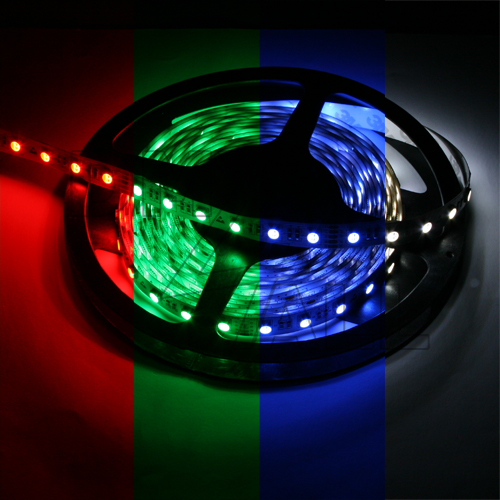
LED-Stripe RGBW 24V 5m 60WSAn easy installation due to optimal flexibility and with a self-adhesive backside the stripes stick to almost each surface.Ideal for room and scenery lighting.Due to the low dimensions an application is possible where usual standard-illuminant can not be used. Colour: Red / Green / Blue / Coolwhite in one LED (4-in-1) !!!Assembled with 300 RGBW SMD-LEDs on 5m. Specifications Power supply:24V DC / Common Anode (+) max. Power consumption:19,2 W/m LED Type:SMD5050 RGBW (4-in-1) CCT:6000-6500K LED view angle:120° Design:self-adhesive backside 300x RGBW LED (60 LEDs/m) divisible each 6 LEDs / 10cm delivery on plastic reel Length / Wide:5m / 12mm
+99 
LED-Stripe RGBWW 24V 5m 60WSAn easy installation due to optimal flexibility and with a self-adhesive backside the stripes stick to almost each surface.Ideal for room and scenery lighting.Due to the low dimensions an application is possible where usual standard-illuminant can not be used. Colour: Red / Green / Blue / Warm-White in one LED (4-in-1) !!!Assembled with 300 RGBWW SMD-LEDs on 5m. Specifications Power supply:24V DC / Common Anode (+) max. Power consumption:19,2 W/m LED Type:SMD5050 RGBWW (4-in-1) CCT:2800-3200K LED view angle:120° Design:self-adhesive backside 300x RGBWW LED (60 LEDs/m) divisible each 6 LEDs / 10cm delivery on plastic reel Length / Wide:5m / 12mm
Delivery time: on stock (1 day)
+68 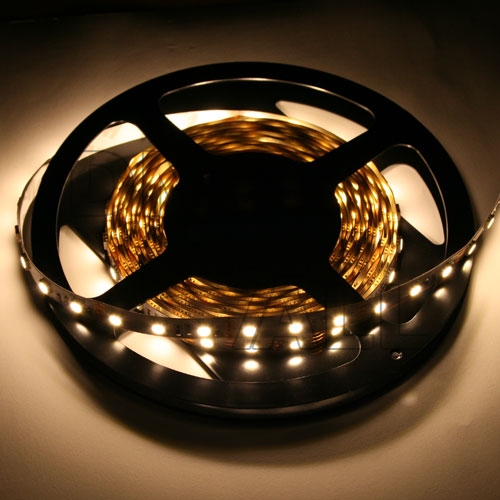
LED-Stripe WHITE 2800-3200K 12V 5m 60WSAn easy installation due to optimal flexibility and with a self-adhesive backside the stripes stick to almost each surface.Ideal for room and scenery lighting.Due to the low dimensions an application is possible where usual standard-illuminant can not be used.Colour: Warm-White - assembled with 300 3Chip SMD-LEDs. Specifications Power supply:12V= Power consumption:up to 6A Power per meter:14,4W Color:Warm-White Angle of radiation per LED:120° Lumen per LED:10-15 Design:adhesive back side 300x SMD LED (SMD5050) devisible each 3 LEDs / 5cm delivery on plastic reel Length:5m Wide:10mm
Delivery time: on stock (1 day)
+68 
LED-Stripe WHITE 8000-10000K 12V 5m 60WSAn easy installation due to optimal flexibility and with a self-adhesive backside the stripes stick to almost each surface.Ideal for room and scenery lighting.Due to the low dimensions an application is possible where usual standard-illuminant can not be used.Colour: White - assembled with 300 3Chip SMD-LEDs. Specifications Power supply:12V= Power consumption:up to 6A Power per meter:14,4W Color:White Angle of radiation per LED:120° Lumen per LED:10-15 Design:adhesive back side 300x SMD LED (SMD5050) devisible each 3 LEDs / 5cm delivery on plastic reel Length:5m Wide:10mm
Delivery time: on stock (1 day)
Tools & Equipment:
+2 
Adam Hall DMX-Kabel (Meterware)The Adam Hall 4 STAR D 234 is perfectly suited for transmission of DMX signals.Our classic with 2 x 0.34 mm² center conductor is also perfect for longer distances,thanks to its bigger cross-section. This highly flexible cable is easy to wind,and thanks to its larger diameter also very robust and therefore also well suitedfor hard road applications.- Adam Hall 4 Star "Standard" Series- Highly flexible, easy to reel- Good shielding thanks to dense copper spiral shielding- Larger inner conductor of 2 x 0.34 mm²- PVC jacket of 6.5 mm diameterDelivery as a section (yard goods) or 100m on a drum.
Delivery time: on stock (1 day)
+2 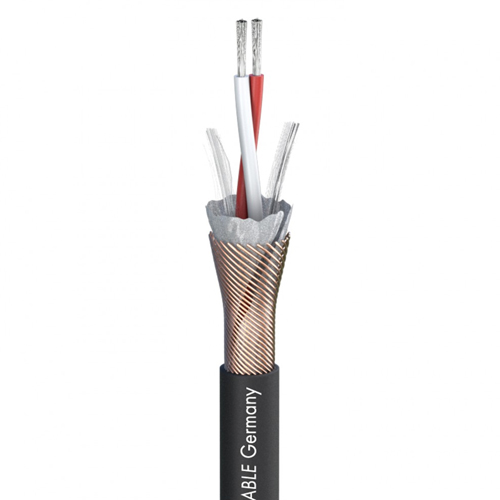
Sommer Cable DMX-Kabel 110 Ohm (Meterware)Das DMX-Kabel ist eine hervorragende Leitung zur Übertragung von Digitalsignalenim 110 Ω AES/EBU und DMX Datenformat. Es besitzt eine Schirmung aus einem aluminiumbedampften Vlies und einem Cu-Spiralwendelschirm mit 100 % Bedeckung.Es ist dadurch sehr gut gegen elektrische Einflüse geschüzt.Vorteile:- Optimale Schirmung durch die Verwendung eines dichten Cu-Wendelschirms + AL/PT-Folie bzw. AL-Vlies- Kompakt und dadurch platzsparendAnwendung:- Professionelle Studio- und Mikrofontechnik- Verbindung von Effektgeräten und Steuereinheiten, bei denen ein Return-Signal benötigt wird- Industrie- und Medizintechnik- Professionelle MIDI-Technik, Überspielkabel- High-End Verbindung von HiFi-Geräten- Steuerung von Licht- und Scanneranlagen und DisplaysLieferung als Abschnitt (Meterware) oder 100m auf Trommel. Technische Daten Eigenschaften:Digital 110 Ω AES / EBU OFC hochreines Kupfer Anwendung:DMX Farbe:Schwarz Signalübertragung:symmetrisch Aufbau:(2LI2Y0,22mm²)(ST)DY Bauform:Rund Durchmesser:5 mm Verkaufseinheit:Meterware als Abschnitt oder 100 Meter auf Trommel BPVo-Euroklasse:Fca Hersteller:Sommer Cable
Delivery time: on stock (1 day)
+1 
Kabel 2x 2,5mm², rot/schwarz (Meterware)- Cross section 2x 2,5 mm²- Cable construction: 2x 50/0,25 mm- External dimensions: 4,0 x 8,0 mm- Plus/minus pole marking- Manufacturer: various Delivery as a section (yard goods) or 100m as a ring.
Delivery time: on stock (1 day)
Power supply:
+59 
MEANWELL HLG-120H-24A (24V/5A/120W)- Universal input- Aluminium enclosure_ Overload protection, current limiting, auto recovery_ Protections: short circuit/over load/over voltage- Built-in active PFC function- Suitable for LED lighting and moving sign applications- EN61000-3-2, Class C, EN55015, EN61347-1, EN61347-2-13- IP65- Adjustable output voltage with internal potentiometer- Adjustable output current with internal potentiometer- Manufactor: MEANWELL- Order code: HLG-120H-24A Specifications Output voltage:24V (einstellbar: 22...27V) Output current, max:5A (adjustable 2,5...5A) Input voltage:90...264V AC (47...63Hz) 127...370V DC Input Inrush Current, max.:60A Operating Temperature:-40...+70°C Weight:1120g Produkt DownloadsHLG-120HDatasheet
Delivery time: on stock (1 day)
+15 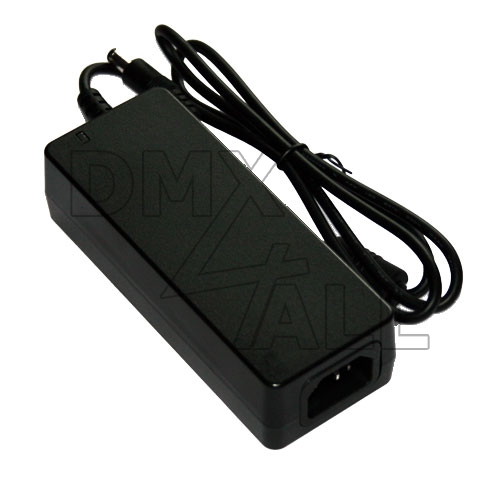
MEANWELL GST60A12-P1J (12V/5A/60W)- Desktop Power Supply- Universal input- Protected against short circuit, overload, overvoltage- Insulation class I- Low idle power- Energy efficiency level VI (DOE)- Manufacturer: MEANWELL- Manufacturer description: GST60A12-P1J Specifications Input voltage range:90...264V AC (47...63Hz) 135...370V DC Inrush, max.:65A Idle power, max.:0,075W Operating temperature range:-30...+70°C Cable length :1m Input connector:C14 (EN60320-1) Output connector:2,1x5,5mm Weight:305g Desktop Switching Power Supply 12V/60W (5A)GST60ADatasheet
Delivery time: on stock (1 day)
Software:
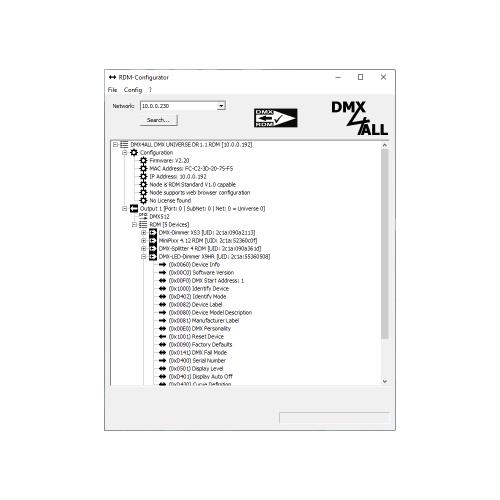
RDM-Configurator FREE-Version (DOWNLOAD ONLY)The RDM Configurator software is a PC-based configuration software for RDM devices.The RDM Configurator is a software that allows you to configure RDM-capable devices.RDM stands for Remote Device Management and enables bidirectional communication betweenconnected RDM-enabled devices.Settings for RDM devices (e.g., start address) can be configured remotely via RDM withoutdirect access to the device. An RDM-capable Art-Net™ RDM gateway is required to use RDM.Once the RDM device is in the system, the unique UID allows device-specific settingsto be configured remotely via RDM command. Direct access to the device is not necessary.Depending on the RDM device used, the properties that can be set via RDM vary.Functionality:Clear user interfaceMulti Art-Net™-Gateway supportArt-Net™-Gateway configurationMulti DMX/RDM-Port supportUser-friendly plain text RDM parameter settingRDM DiscoverRDM GET-ParameterRDM SET-ParameterDMX4ALL MSC-Parameter (Manufacturer Specific Command)RDM SubDevice-SupportRDM Sensor-SupportDMX-Fader PanelDMX-MonitorSaving RDM parameters to configuration fileFREE version restrictions:RDM SET parameters for non-DMX4ALL RDM devicesRestoring RDM parameters via configuration fileAutoRefresh of the RDM sensorsFastDMX-AddressingFor the limited functions (setting parameters in non-DMX4ALL-RDM devices)an optionally available license is required.The license requires a DMX4ALL RDM gateway on which the license key is stored.RDM-Configurator Operating system:Windows® Software-Updates:Available as download Produkt DownloadsRDM-ConfiguratorBedienungsanleitung RDM-ConfiguratorUser Manual RDM-ConfiguratorSoftware
Delivery time: on stock (1 day)
+236 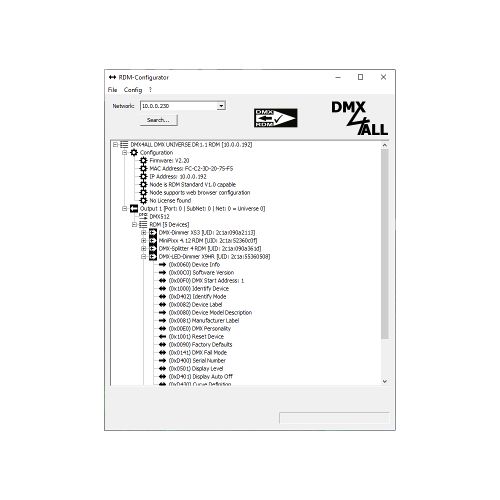
RDM-Configurator A DMX4ALL RDM gateway is required for the license; the license key is stored on it.The following RDM gateways are suitable:DMX UNIVERSE DR1.1 RDMDMX UNIVERSE DR6 RDMDMX UNIVERSE DR6 RDM+DMX STAGE-PROFI 1.1 RDM (XLR3)DMX STAGE-PROFI 1.1 RDM (XLR5)DMX STAGE-PROFI 1.1 PoE (XLR3)DMX STAGE-PROFI 1.1 PoE (XLR5)DMX TwinPOE AP RDMImportant: For rapid processing, please include the device's MAC address in the comments section during checkout!The RDM Configurator software is a PC-based configuration software for RDM devices.The RDM Configurator is a software that allows you to configure RDM-capable devices.RDM stands for Remote Device Management and enables bidirectional communication betweenconnected RDM-enabled devices.Settings for RDM devices (e.g., start address) can be configured remotely via RDM withoutdirect access to the device. An RDM-capable Art-Net™ RDM gateway is required to use RDM.Once the RDM device is in the system, the unique UID allows device-specific settingsto be configured remotely via RDM command. Direct access to the device is not necessary.Depending on the RDM device used, the properties that can be set via RDM vary.Functionality:Clear user interfaceMulti Art-Net™-Gateway supportArt-Net™-Gateway configurationMulti DMX/RDM-Port supportUser-friendly plain text RDM parameter settingRDM DiscoverRDM GET-ParameterRDM SET-ParameterDMX4ALL MSC-Parameter (Manufacturer Specific Command)RDM SubDevice-SupportRDM Sensor-SupportDMX-Fader PanelDMX-MonitorSaving RDM parameters to configuration fileAdditional features with license:RDM SET parameters for non-DMX4ALL RDM devicesRestoring RDM parameters via configuration fileAutoRefresh of the RDM sensorsFastDMX-AddressingFor the limited functions (setting parameters in non-DMX4ALL-RDM devices)an optionally available license is required.RDM-Configurator Operating system:Windows® Software-Updates:Available as download Produkt DownloadsRDM-ConfiguratorBedienungsanleitung RDM-ConfiguratorUser Manual RDM-ConfiguratorSoftware
+58 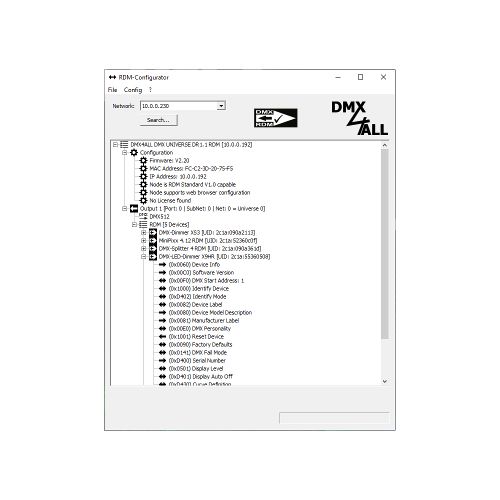
RDM-Configurator Monthly License A DMX4ALL RDM gateway is required for the license; the license key is stored on it.The following RDM gateways are suitable:DMX UNIVERSE DR1.1 RDMDMX UNIVERSE DR6 RDMDMX UNIVERSE DR6 RDM+DMX STAGE-PROFI 1.1 RDM (XLR3)DMX STAGE-PROFI 1.1 RDM (XLR5)DMX STAGE-PROFI 1.1 PoE (XLR3)DMX STAGE-PROFI 1.1 PoE (XLR5)DMX TwinPOE AP RDMImportant: For rapid processing, please include the device's MAC address in the comments section during checkout!The RDM Configurator software is a PC-based configuration software for RDM devices.The RDM Configurator is a software that allows you to configure RDM-capable devices.RDM stands for Remote Device Management and enables bidirectional communication betweenconnected RDM-enabled devices.Settings for RDM devices (e.g., start address) can be configured remotely via RDM withoutdirect access to the device. An RDM-capable Art-Net™ RDM gateway is required to use RDM.Once the RDM device is in the system, the unique UID allows device-specific settingsto be configured remotely via RDM command. Direct access to the device is not necessary.Depending on the RDM device used, the properties that can be set via RDM vary.Functionality:Clear user interfaceMulti Art-Net™-Gateway supportArt-Net™-Gateway configurationMulti DMX/RDM-Port supportUser-friendly plain text RDM parameter settingRDM DiscoverRDM GET-ParameterRDM SET-ParameterDMX4ALL MSC-Parameter (Manufacturer Specific Command)RDM SubDevice-SupportRDM Sensor-SupportDMX-Fader PanelDMX-MonitorSaving RDM parameters to configuration fileAdditional features with license:RDM SET parameters for non-DMX4ALL RDM devicesRestoring RDM parameters via configuration fileAutoRefresh of the RDM sensorsFastDMX-AddressingFor the limited functions (setting parameters in non-DMX4ALL-RDM devices)an optionally available license is required.RDM-Configurator Operating system:Windows® Software-Updates:Available as download Produkt DownloadsRDM-ConfiguratorBedienungsanleitung RDM-ConfiguratorUser Manual RDM-ConfiguratorSoftware
 This website uses cookies to ensure the best experience possible.